Report Automation is the automation of recurring Excel report preparation. In many companies the same scenario repeats every week or month: an employee downloads one or several Excel files, merges them, cleans the data, recalculates the figures, updates the tables and prepares a report for management.
The next week the whole process starts again. Even though the report itself barely changes, all the manual work is repeated over and over.
- What is Report Automation?
- What does manual report preparation look like?
- Why do companies waste so much time?
- What does an automated process look like?
- Which reports are worth automating?
- What tools are used?
- What does a company gain?
- Is your report worth automating?
- Frequently asked questions
- Conclusion
What is Report Automation?
Report Automation is a process where recurring report preparation is automated so that most of the manual actions are performed automatically.
Instead of reworking the data from scratch each time, you build a system that performs the same actions based on predefined logic.
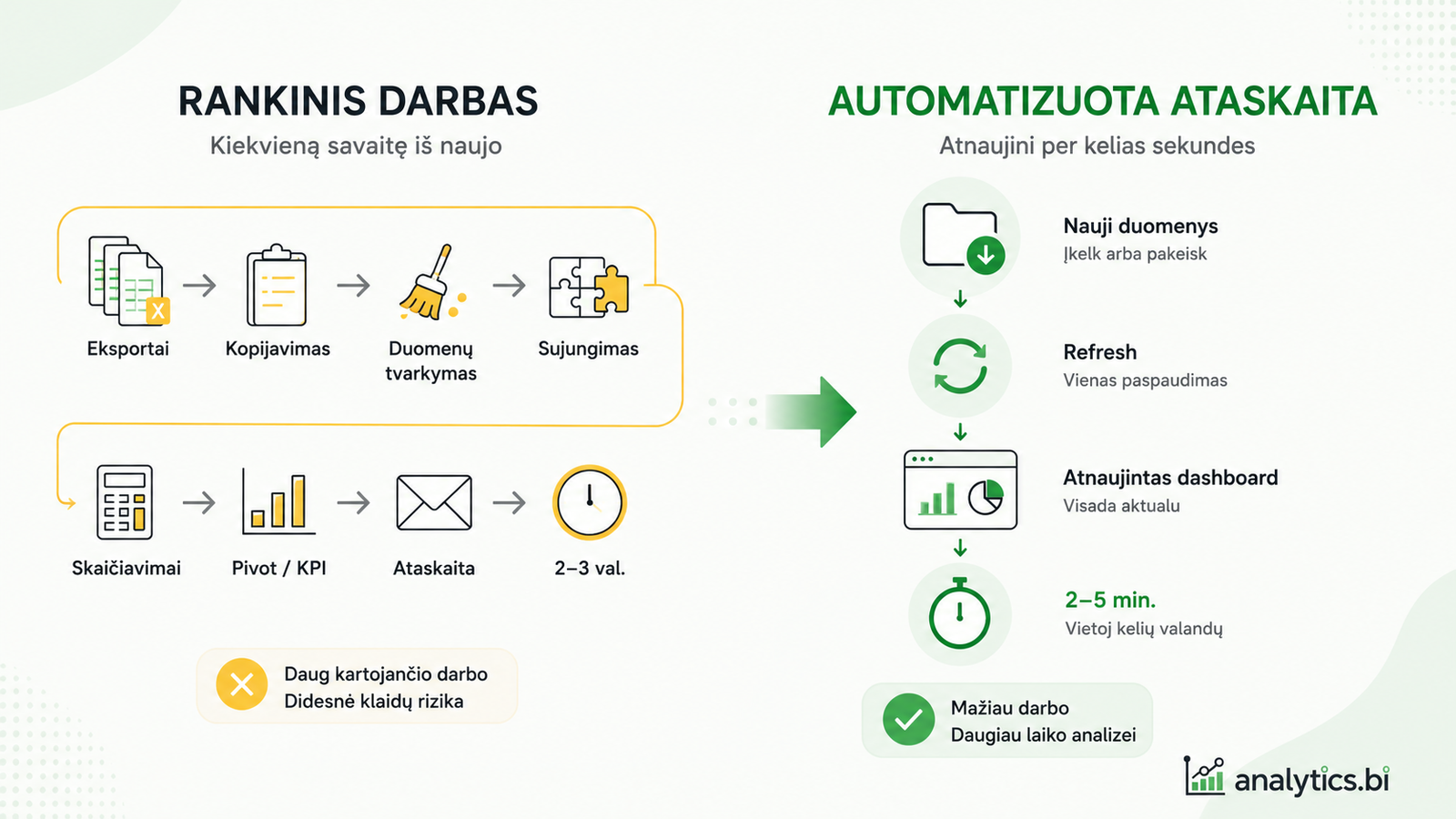
A typical process looks like this:
- new data is received or loaded;
- the data is cleaned automatically;
- the calculations are updated;
- the report refreshes at the click of Refresh.
The system is set up once, and afterwards you only need to load new data and refresh the report.
What does manual report preparation look like?
In many organizations the process looks similar:
- one or several Excel files are downloaded;
- data is copied;
- unnecessary columns are removed;
- dates, codes or names are fixed;
- several tables are merged;
- Pivot tables are refreshed;
- KPIs are calculated;
- the final report is prepared.
The next week or next month, all of it is repeated again.
At first glance each action looks short, but together they can take several hours a week.
Example
Say a weekly sales report has to be prepared every Monday.
The employee downloads three Excel exports, merges them into one table, cleans the data, updates the KPIs and sends the result to management.
This process is repeated every week, even though only the data changes.
The goal of Report Automation is to automate this process so that next week it’s enough to load the new data and pressRefresh.
Why do companies waste so much time?
Usually the problem isn’t Excel itself.
The problem is the process.
Companies lose a lot of time because:
- several different data sources are used;
- exports are regenerated every week;
- the data has to be cleaned manually;
- different files have inconsistent structures;
- the same work is repeated constantly;
- errors are checked manually.
Every extra manual step means not only more time, but also a higher chance of errors.
What does an automated process look like?
A well-designed automated process looks much simpler.
- New data is downloaded or received.
- The old data is replaced or the source table is topped up.
- Refresh is pressed.
- The report refreshes automatically.
Instead of dozens of manual actions, only a few clear steps remain.
This doesn’t mean there’s no work left. But most of the repetitive actions are done automatically.
Which reports are worth automating?
Not every Excel file is worth automating.
The biggest benefit comes from processes that repeat regularly.
For example:
- weekly activity reports;
- monthly sales reports;
- KPI summaries;
- financial reports;
- project tracking reports;
- production metric analysis;
- management reports.
If you prepare the same report every week or month, chances are at least part of the process can be automated.
What tools are used?
Report Automation isn’t one specific tool.
Depending on the situation, you might use:
- Excel;
- Excel Table;
- Power Query;
- Pivot tables;
- Excel dashboards;
- Power BI.
What matters isn’t the technology but the result — reports prepared faster and more reliably.
What does a company gain?
Automated report preparation lets you:
- shorten report preparation time;
- reduce the amount of manual work;
- reduce the chance of errors;
- standardize processes;
- prepare information for decision-making faster.
Often the biggest benefit isn’t just time saved. Even more importantly, employees can focus more on analyzing the data rather than copying it.
Is your report worth automating?
Think about your own work process.
If you answer “yes” to even a few questions, automation is worth considering.
- Do you prepare the same report every week or month?
- Do you perform the same actions every time?
- Do you use several Excel exports?
- Do you often copy and clean data?
- Does preparing the report take longer than 30 minutes?
If so, chances are at least part of the process can be automated.
Frequently asked questions
Does Report Automation only work with Excel?
No. Excel, Power Query, Power BI and other tools can be used for automation. Excel is often the first step, because many companies already have their reports in Excel.
Is it worth automating one-off reports?
Usually not. The biggest benefit comes when a report repeats every week or month.
Will an automated report always work?
Automation works best when the data structure stays reasonably stable. If the export structure changes, the automation logic may need updating too.
How much time can be saved?
It depends on the complexity of the process. But if a report is prepared manually every week, even several hours of work can often be cut down to a few minutes.
Conclusion
Report Automation isn’t just a set of Excel functions or a Power Query solution.
It’s a way to replace repetitive manual work with a clear and easily maintainable process.
Instead of performing the same actions from scratch every week, the system is set up once, and afterwards the report is refreshed with just a few clicks.
Can your Excel reports be automated?
If you perform the same actions every week or month, chances are at least part of the process can be automated.
Get in touch — I’ll assess whether your report preparation can be simplified.
Assess the optionsPower Query cheat sheet: automate your report
The key steps, the 5 common mistakes, and when automating is worth it.
- PDF · 2 pages, practical
- No spam — value only